
Month-end review
Month-End Review for Corporate Card Expenses
For close teams reviewing corporate card expenses before export. Filter flagged issues, resolve missing evidence, and export XLSX files with documents that stay linked.
Start month-end reviewCurrent workflow
Month-end review gets noisy when clean rows and exceptions mix.
The close slows down when reviewers cannot isolate what still needs judgment.
- Reviewers scan full statements looking for the few rows that need action.
- Missing receipts and amount mismatches are mixed with clean rows.
- Notes and support files are hard to keep aligned.
- XLSX exports and document folders need manual reconciliation.
This workflow starts after corporate card reconciliation and uses the receipt-level detail captured for sales tax evidence.
How FinSnap works
Review, resolve, and export the close package.
FinSnap keeps month-end review focused on unresolved items and export readiness.
- 1
Upload statement
Start the month-end period with the card statement that needs review.
- 2
Upload receipts
Add available receipts so evidence can be matched before review.
- 3
Automatic matching
FinSnap groups matched rows and keeps uncertain rows separate.
- 4
Flagged exceptions
Filter to missing receipts, tax gaps, amount mismatches, and low-confidence matches.
- 5
Export results
Export XLSX and linked documents once exceptions are resolved.
Product visual
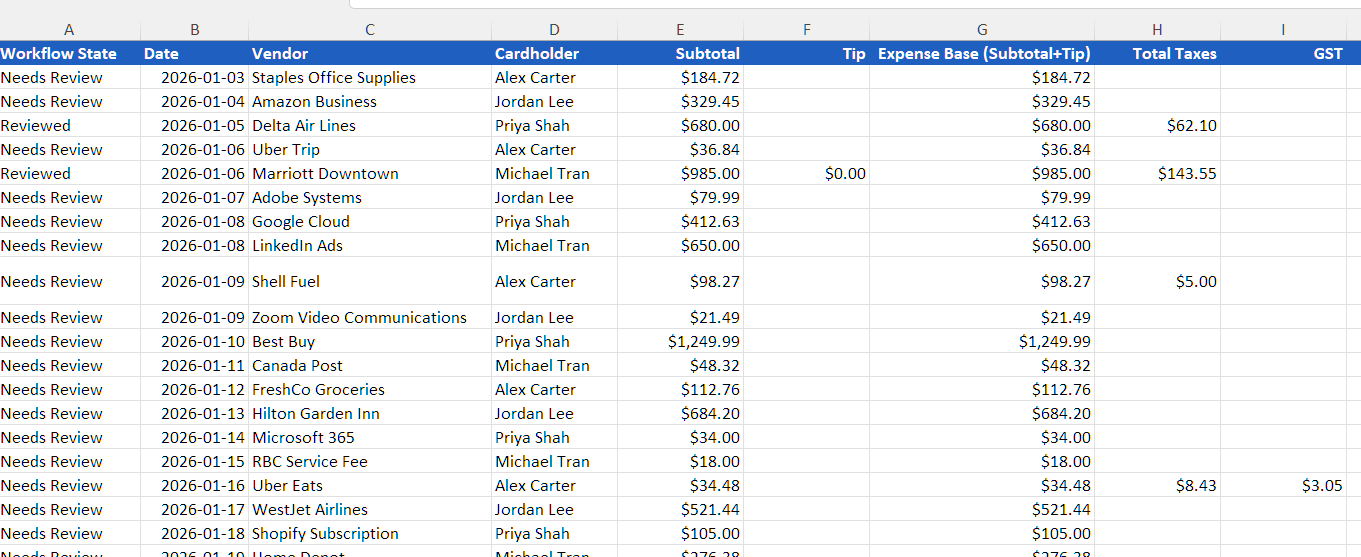
Export package with linked support
Review ends with XLSX output and document links that remain aligned.
What you get
Audit-ready files from a resolved review
The export should stay useful after it leaves the workspace.
Filtered issue list
Missing receipts, mismatches, and low-confidence rows stay easy to find.
Resolved review notes
Reviewer decisions remain attached to the relevant transactions.
Consistent XLSX export
The spreadsheet keeps clean columns for accounting review and archiving.
Linked documents
Receipt files stay aligned with the exported transaction rows.
Example scenario
A concrete review outcome
When complete, your team has a final record of items and supporting backup, ready for upload to your system and for future audit backup.
“83 transactions exported to XLSX with links to consistently named receipt files in one zip package.”When the folder is extracted, every receipt filename maps back to the spreadsheet row for the journal entry package and future audit support.
Next step
Review the period and export support
Start with the statement, clear the exceptions, and finish with linked files.