
Expense and sales tax evidence
Extract Expense and Sales Tax Evidence from Receipts
For accountants and bookkeepers who need receipt-level tax detail. Upload receipts with card transactions, extract GST, HST, PST, or sales tax, review uncertain items, and export structured evidence.
Upload receiptsCurrent workflow
Statements do not contain the tax evidence.
The source detail is usually on the receipt, but it is not ready to use.
- Card statements show totals but not tax detail.
- Receipts are stored in inboxes, folders, and cardholder uploads.
- Tax, tip, vendor, and category evidence is copied manually.
- Coding decisions are hard to explain when source detail is missing.
The extracted evidence supports corporate card reconciliation and gives month-end review cleaner data.
How FinSnap works
Extract receipt evidence and keep it reviewable.
FinSnap turns receipt details into structured accounting evidence without hiding uncertain items.
- 1
Upload statement
Upload the card statement so each receipt can be tied to a transaction.
- 2
Upload receipts
Add receipts as PDFs, images, or scans from the period.
- 3
Extract tax evidence
FinSnap reads receipt totals, GST, HST, PST, sales tax, tip, and vendor detail.
- 4
Flagged exceptions
Unclear tax lines, missing receipts, and low-confidence matches remain in review.
- 5
Export results
Export receipt-level evidence with transaction links and coding context.
Product visual
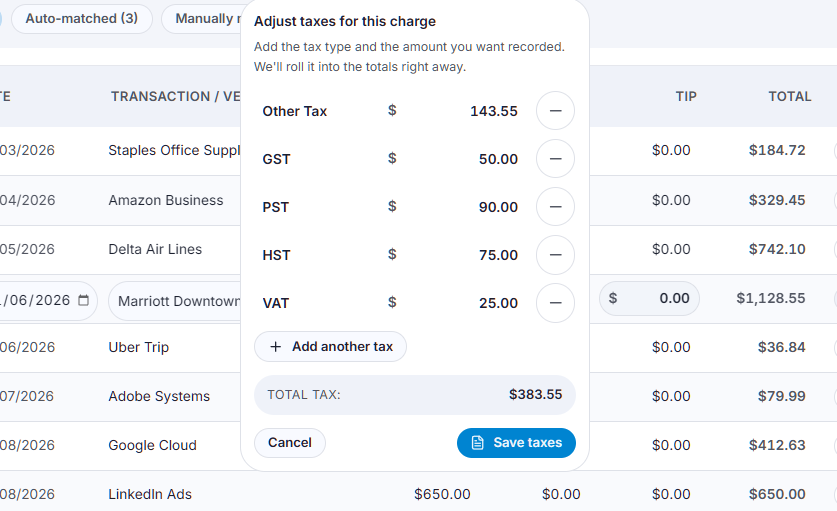
Receipt tax lines structured for review
Reviewers see the receipt detail that supports recovery, coding, and audit follow-up.
What you get
Tax and expense evidence tied to the source receipt
The output is structured evidence that stays connected to the transaction.
Extracted tax amounts
GST, HST, PST, and sales tax values are captured from receipt detail.
Receipt context
Vendor, total, tip, and purchase evidence stay available for review.
Classification support
Expense coding can use source evidence instead of statement totals alone.
Linked documentation
Exported evidence remains tied to the original receipt and transaction.
Example scenario
A concrete review outcome
When complete, your team has a final record of items and supporting backup, ready for upload to your system and for future audit backup.
“$34,000 across 48 transactions. 37 receipts with claimable GST, 5 with foreign tax, 6 with no GST.”The team itemizes the receipt-level tax evidence, separates non-claimable amounts, and prepares support for a $1,300 GST refund claim.
Next step
Upload receipts for tax evidence
Use the receipt as the source of truth for recovery, coding, and review.